
DepoHub by BlueBear
One record from deposition through trial.
DepoHub is deposition designation software for trial teams. While the record is being built, search every deposition at once and tag what matters. When the case moves toward trial, designate, object and exchange in the same record, with the video attached through playback.
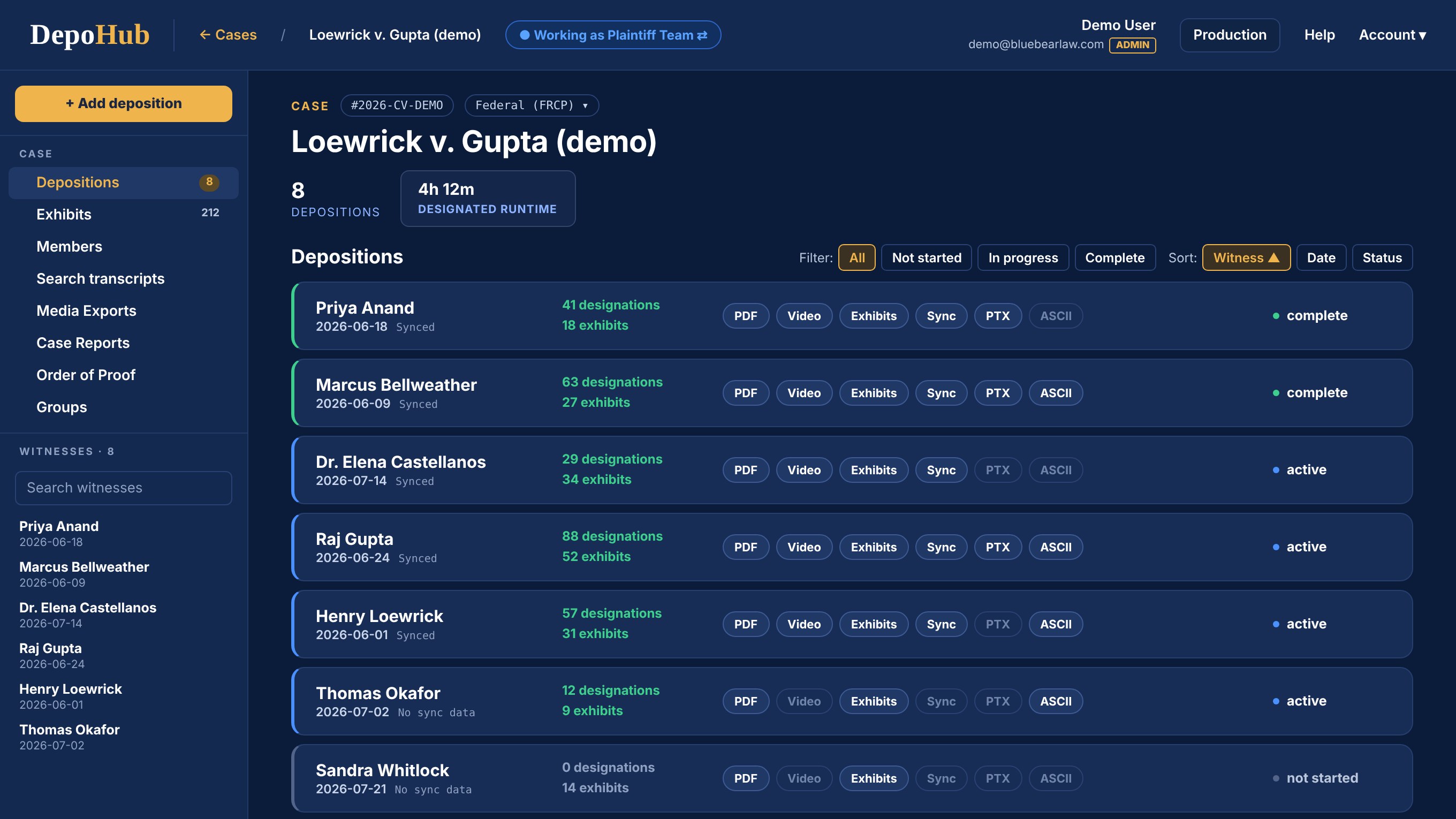
Who it is for
Antitrust, MDL and complex commercial trials often put hours of deposition testimony in front of a jury. The witnesses who matter most are often beyond the court's reach, so the jury meets them on video. Dozens of depositions, taken over years by several firms, each with designations, counters, objections and rulings that change until the week before trial. DepoHub keeps all of it in one record, from the first transcript to the clip the jury sees.
Designation work usually lives in several places. A spreadsheet for the exchange. Presentation software for playback. The reporting firm's files for the record. The more testimony you play, the more the handoffs between them cost you.
One record instead of eight handoffs.
Is it your case?
If that is your case, it was built for you. If you are playing two clips, we will just cut them for you.
Clip studio →For the partner signing off
The five things a firm's technology committee or IT group asks first, answered before the walkthrough.
The whole case team and co-counsel at other firms, no seat licenses to manage.
OnCue, TextMap, exchange workbooks, clips and reports, whenever you want.
United States infrastructure, encrypted in transit and at rest, never used to train external AI.
Invitation only accounts, role based access and a full audit and exchange history.
A technical security overview your IT group can review before the first login.
How it works
While the record is being built
Start the day the first transcript arrives. Search every deposition in the case at once, not one transcript at a time. Tag testimony by issue as you read. When designations are due, promote any tagged range to a designation in one step, with word level trims and notes intact.
When the case moves toward trial
The organized record becomes designations, counters, objections, rulings and final testimony without being reconstructed anywhere else. The three steps below.
Work in the transcript, not around it. Highlight testimony to designate it. Build multiple sets and versions. Add counters. Trim to the word. Preview the synced video without leaving the witness.
One record of every objection, response and ruling. Track objections against the testimony they apply to. See what remains unresolved. Record responses, meet and confer outcomes and court rulings without keeping another spreadsheet.
Exchange work product without losing control. Export a designation workbook for your team to check against the court's requirements, then serve it. Bring opposing counsel's objections and counters back into DepoHub. Each side controls its private work until it is actually served.
Read and sign, built in
The witness reviews the transcript through a secure link, submits errata and signs electronically. Any designation that touches a correction is marked "subject to signed errata," so corrections reach your designations before the pretrial conference.
How DepoHub compares
The best designation software is the one that keeps the testimony, the objections and the video in one record all the way to playback. Here is how DepoHub handles the work compared with the spreadsheets and email many trial teams still use.
| THE WORK | DEPOHUB | SPREADSHEETS AND EMAIL |
|---|---|---|
| Search across transcripts | Every deposition in the case at once | Open each PDF and search it |
| Line level and word level edits | Trim a designation to the line or the word, in the transcript | Retype the page and line range |
| Issue tags that become designations | Tag as transcripts arrive, promote in one step | A second spreadsheet |
| Objections, responses and rulings | Tracked against the testimony they apply to | A separate list, reconciled by hand |
| Exchange with the other side | Export the exchange workbook, bring counters back in, private until served | Email attachments and version names |
| Video while you designate | Synced video preview without leaving the witness | None until the vendor cuts clips |
| Handoff to the courtroom | Exports to OnCue and TextMap, and the tuned OnCue file comes back | A page and line list for someone to rebuild |
| Seats | Unlimited, including co-counsel at other firms | Whoever has the latest file |
Compare it with your current process on one of your own depositions.
Request a walkthroughTo trial
Export designation workbooks, clips and reports from the same record, ready for your trial tech to check in the presentation system. Nothing is retyped from a page and line list.
DepoHub does not replace your trial presentation software. It makes what you send to it better. The finished cut goes to your trial tech for OnCue. Their tuned OnCue file comes back into DepoHub, so everyone works from the same final version and the cut as played is preserved.
DepoHub and BlueBear
We report the deposition and play it at trial. We built DepoHub to connect the work between them.
BlueBear reports it
Transcript, exhibits, synced video and sync files, organized by witness in your firm's DepoHub case. Your team searches and tags the record in the DepoHub Repository, then moves to the Workspace when it is time to designate, object and exchange.
Court Reporting →Another reporting firm took it
DepoHub takes transcripts, video and sync files from any reporting firm, so the entire case stays together. Even PDF only transcripts load at their printed page and line.
BlueBear at trial
The BlueBear team that loaded and checked the record plays the clips at counsel table. The people who answer the night before trial already know your case.
Trial Presentation →Why DepoHub
Not document review software adapted for depositions. DepoHub follows the way designation work actually moves toward trial.
Bring in the full case team and co-counsel from other firms without managing seat licenses.
One designation record produces OnCue and TextMap files, exchange workbooks, reports, clips and final video.
Plaintiff and defense groups control what remains private and what has actually been served.
Export the entire case whenever you want, in formats your team can use without DepoHub.
Loop the first and last seconds of every clip and fix the cut by ear. A clip trimmed in DepoHub plays trimmed in OnCue.
Record sustained, overruled, withdrawn, deferred or resolved by agreement on every objection. Compare any two rounds to see what changed.
Every new designation is checked against the ones already there, including imports. Keep both, trim to fit or cancel.
Built for confidential litigation
Your IT group will ask these questions before your trial team ever logs in. Here are the answers in writing.
Questions
Software for the work between the deposition and the trial: selecting the testimony you intend to play or read, exchanging it with opposing counsel, tracking objections and rulings against it, and producing what the courtroom needs.
Search every transcript in the case at once, let you edit a designation to the line and the word, keep objections and rulings attached to the testimony, handle the exchange with the other side, and hand a finished cut to your trial presentation software without anyone retyping it. Those are the tests we built DepoHub to pass.
Trial teams running complex cases with meaningful deposition testimony. Lawyers, paralegals and trial technicians work in the same case.
Yes, and that is when it helps most. Search every deposition in the case and tag testimony by issue as transcripts arrive. Those tags become designations when the deadline comes.
Yes. DepoHub produces the formats trial teams already use, including OnCue and TextMap, along with exchange workbooks, reports and video clips.
Yes. DepoHub takes transcripts, video and sync files from any reporting firm. It is faster when BlueBear reports the deposition, because the record is already in your DepoHub case.
Yes. Seats are unlimited and access is set by role, so co-counsel from every firm can work in one workspace.
DepoHub was built by a team that works at both ends of the testimony, from the deposition itself through courtroom playback. It keeps testimony, objections, rulings and video connected in one record as the case moves toward trial.
Ask for a walkthrough and we will show your team DepoHub on a real transcript. Bring a deposition transcript and we will load it during the call.
Tell us about the matter and we will walk your team through DepoHub on a real transcript.
We read every request personally. No automated sequences.
Or write to George Inmon directly at george@bluebearlaw.com

We provide premium court reporting, trial logistics, courtroom presentation and visuals. Headquartered in Atlanta with a team in Nashville, serving trial teams nationwide.

Copyright © 2026 BlueBear Solutions Inc.